Context
The Accor group is strongly engaged in various sustainability initiatives within the hospitality industry, including reducing the carbon footprint of purchased goods, particularly in the food and beverage categories, which are the most commonly ordered products by our hotels and partners.
To support our customers and promote this cause, Astore Shop now allows suppliers to indicate the origin region of their offers as an attribute. This enables hotels to make informed decisions about purchasing items that are local to them, thereby reducing carbon emissions. A Regional Map will be displayed on AstoreShop.com, where hotels can select their relevant region and be directed to a category showcasing only the items produced in that region.
What is an attribute on an offer file in Mirakl?
In Mirakl, an attribute on an offer file refers to a characteristic or feature of a product that is listed for sale on the platform. An attribute can provide important information about the product, such as its color, size, weight, material, or any other relevant specification. Attributes can be used to help buyers find and compare products, and to provide detailed information about the product to the seller. Mirakl allows sellers to include various attributes for their products to make them more searchable and informative, and buyers can filter their search results based on these attributes. The use of attributes on an offer file can help improve the discoverability of products and the overall buying experience for customers.
The region of origin attribute in Mirakl
The "region of origin" attribute in Mirakl is a feature that allows sellers to indicate the geographical origin of their products or offers. This attribute is particularly useful in the context of sustainability and reducing the carbon footprint of purchased items. By indicating the region of origin, sellers can help buyers make informed decisions based on the location of the product's production. Additionally, this attribute allows hotels and other buyers to consciously choose to purchase items that are "local" to them, which by default reduces carbon emissions associated with transportation. The region of origin attribute can be created and managed by the seller or platform operator, depending on the platform's settings. It provides an additional layer of information that can help both buyers and sellers make more informed decisions.
What does this mean for you as a supplier?
To add the region of origin attribute to your offers in Mirakl, you need to go to your offer file and edit it by adding the relevant information in the "region of origin" field. It is important to ensure that this information accurately represents the region where the product is sourced or manufactured.
The impact of adding this attribute is that it allows hotels and partners to make more sustainable purchasing decisions by selecting products that are sourced from nearby regions, thereby reducing the carbon footprint associated with transportation. This can also provide an opportunity for you to showcase your commitment to sustainability and promote your products to customers who prioritize sustainability in their purchasing decisions.
A Local Product on Astore Shop
A local product is a product that is grown, produced, or manufactured within a specific geographic region or community. It means that the product has not traveled long distances and has a smaller carbon footprint than products that have been imported from far away. Local products are seen as more sustainable because they support the local economy, reduce transportation emissions, and promote a connection between consumers and the producers of the products they purchase.
Business Rules and definition of region of Origin
The guidance for accurately updating your products in line with our business rules on "Region of Origin" is as follows:
- Our category managers have defined what "Region of Origin" means for your country.
- We define "Region of Origin" as the region or county within the country where the product is sourced or manufactured. The regions have specific naming conventions, for example, "UK-Greater London, UK-Hertfordshire, UK-Surrey" or "FR-92, FR-75."
- For transformed products, the origin is defined by the farthest place of production for any item within the transformed product. If over 75% of the transformed product is from a local region, it can be defined as a local product.
- Packaging may or may not be taken into consideration for a local product. Accor chooses to focus on the origin of the product and ignore where the packaging originated from.
- Please note that categories XYZ are currently not included in the "Region of Origin" feature.
By following these guidelines, you can update your products to include accurate information on their region of origin, which helps us make more sustainable purchasing decisions and reduce our carbon footprint.
An example
Assuming you are a supplier located in Bordeaux, France and you supply tomatoes to hotels within France. You have listed your tomatoes on Astore Shop with the following information:
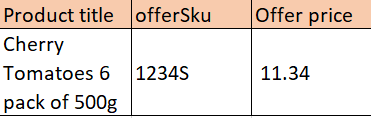
During January to June, your cherry tomatoes are sourced from Spain as the climate produces better tomatoes there. From June to December, however, the cherry tomatoes are sourced from Aquitaine, France.
The French Accor team has identified "Aquitaine, France" as a region labeled FR-03. Since Spain does not count as a locally produced product for French hotels, you will need to upload a new offer file in June that includes the region of origin "FR-03" for your offer 1234S. In January, you will need to upload an offer file that indicates SKU 1234S does not have a region of origin in France.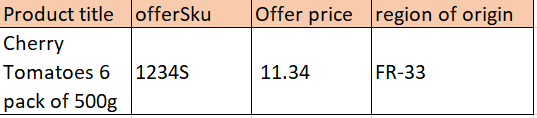
How can you link an offer of one of these regions?
The attribute "Region of origin" can now be indicated by each supplier on every offer line through Astore Shop. There are three methods available to load offers on Astore Shop:
- Manually: On the Mirakl interface
- CSV or Excel File: Which could be load on the Mirakl interface or onaFTP server
- API: with the API OF01 provided by Mirakl
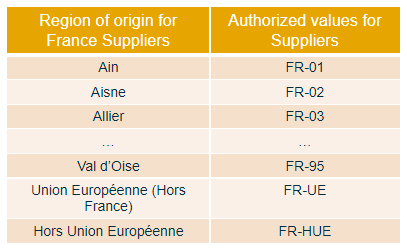
Regardless of the import method, suppliers are required to fill in the "Region of origin" attribute with one of the authorized values.
Warning: The suppliers must select one of the value which starts by the two letters of the commercial zone.
Example 1: A supplier for hotels in France must select a value starting by FR
Example 2: A supplier for hotels in Spain must select a value starting by SP
The French website will not display anything if a supplier for hotels in France selects a value that starts with "SP".
Example of a supplier who manages offers manually on Mirakl
If you manage your offers manually through the Mirakl interface, follow these steps:
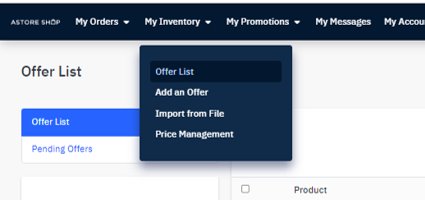
- Go to your Mirakl shop and click on "My Inventory" > "Offers List"
- Select the offer you want to edit
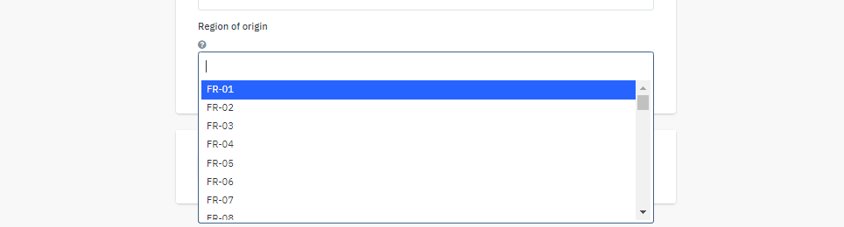
- Scroll down to the "Region of Origin" attribute and choose the appropriate value(s) from the list
Please note:
- If you are selling your offers in France, you must select a value that starts with FR
- If you are selling your offers in Portugal, you must select a value that starts with PT
- ETC.
Example of a supplier who manages offers through excel/csv file
When managing offers through an Excel file, you can easily add a new column to your current excel template with the label "Region of Origin" and/or the code "origin-region":
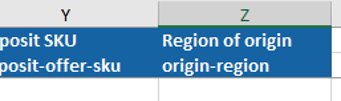
To update the impacted offers, simply fill in the corresponding cells with the values listed in the "Reference Data" tab. If multiple values apply, separate them with a comma: “,”.
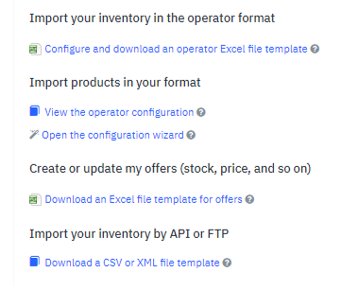
You can also download a new template by clicking on:
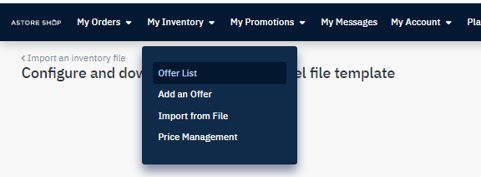
- “My Inventory” > “Import from File” > Download an Excel file template for offers
- Follow the usual process to import your file.
Example of a supplier who manages offers through API
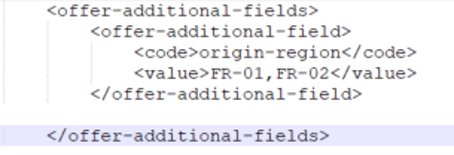
If you typically manage your offers using the Mirakl API OF01, you can add the "origin-region" attribute in the offer-additional-fields tag. Then, add the appropriate value(s) for the relevant offers. If there are multiple values, separate them using a comma ",".